Thursday, July 10, 2008

OCSDKWrapper Project on CodePlex

George Durzi wrote a really nice wrapper for the Office Communicator SDK. He also included a sample application to get you started.

The Office Communicator SDK is actually pretty easy to use, but some parts could have been easier. Especially cleaning up when the connection is lost. Monitoring the status of the connection. Connecting to communicator.

And exactly that functionality he addressed with this OCSDKWraper.

Please check out his blogpost: OCSDKWrapper Project on CodePlex

Tags van Technorati: ,,

Tuesday, July 1, 2008

Joachim just received the Microsoft MVP Award

I have to congratulate Joachim Farla for receiving the MVP award.

http://Unified-communications.blogspot.com

Marc

Getting/Setting presence protocols

About a month ago I downloaded all of the Microsoft Office Protocol Documents as a single zip file. I did the same today because I noticed that there were new version of these documents.

What really made me wonder was that it weren't the same number of documents. As I am especially interested in the sip protocols, I noticed that the protocols for getting presence weren't in there anymore.....[MS-SIP].

Turned out that they were moved to a different location.

For anyone who is interested: http://msdn.microsoft.com/en-us/library/cc239903.aspx

Presence Protocols

Microsoft has just released a final version of their presence protocols (the one I used for presence subscription with UCMA).

For any one who is interested in a deeper understanding of presence, this document can give you more insight.

http://msdn.microsoft.com/en-us/library/cc431501.aspx

Friday, June 27, 2008

WPF Presence Screen saver

Based on the WPF Custom Screen Saver Art artikel by Erik Klimczak on coding4fun, a colleague of mine, Michiel van Oudheusden decided to extend this screen saver to show real presence.
screenshot

Showing presence icons and the friendly name of the user. Next to this presence there is a kind of notification for incoming messages. The icon is going to blink.

The presence information is build with Microsoft Office Communicator 2007 SDK.

You can download the source code of this C# sample project code from codeplex.

More information here.

For running this sample you have to need Office Communicator 2007 installed. This code doesn't run on 64 bit machines.

There is one strange thing I encountered. The presence only changes if there is an other product running that is integrating with communicator (Outlook).

For more information you can contact Michiel.van.Oudheusden@e-office.com or me sip:Marc.Wetters@e-office.com

UC Development Samples

For all who want to start developing UC apps here are some new samples from Microsoft.

Incoming Call Screen Pop

Microsoft Unified Communications Client API 1.0 Sample Registers for incoming calls and pops up another app based on the caller ID info.
http://www.microsoft.com/downloads/details.aspx?FamilyId=84AC7DD7-99D3-48F7-99D7-A281BD616407&displaylang=en

Presence in a Communications Web Client

Microsoft Unified Communications AJAX API Sample Shows how to use the UC AJAX Services API to put presence and IM into a web app.
http://www.microsoft.com/downloads/details.aspx?FamilyId=AEBFA4E2-B30E-43A6-BF34-6403465BC9A9&displaylang=en

Presence in Web Applications

Microsoft Office Communicator 2007 Automation API Sample Shows how to use the MOC automation API to show presence in web pages. Uses the name.ctrl that SharePoint uses as well as
the custom ActiveX presence control.
http://www.microsoft.com/downloads/details.aspx?FamilyId=32CA6DA5-42A2-4B96-B13C-644AD8256645&displaylang=en

Presence in Managed Applications

Microsoft Office Communicator 2007 Automation API Sample
Uses the MOC automation API and two custom WinForms controls to show
presence in WinForms apps and launch collaboration sessions.
http://www.microsoft.com/downloads/details.aspx?FamilyId=CBD51E8A-13BB-4F06-9CD5-E737E51E4B54&displaylang=en

Presence in Rich Clients

Unified Communications 2007 AJAX Service Sample Shows how to use the UC AJAX Services to provide presence and IM in a rich client app.
http://www.microsoft.com/downloads/details.aspx?FamilyId=7F11D95D-5AFD-4B8A-84AF-4B7A9720AADF&displaylang=en

Ethical Walls for Microsoft Office Communications Server 2007

Microsoft Office Communications Server 2007 API Sample Uses the OC Server API to show how to block sessions between specified users at the server level.
http://www.microsoft.com/downloads/details.aspx?FamilyId=070DBCAB-472A-4EC1-AEAC-9273ECCD70C9&displaylang=en

Custom Alerting

Microsoft Office Communications Server 2007 API Sample Uses a custom desktop client written using the UCC API and an alert sender written using the UCMA API to send alerts to users.
http://www.microsoft.com/downloads/details.aspx?FamilyId=9EFC784B-E443-4441-926C-5FD405D41BD9&displaylang=en

Group and Contact Management Using WMI

Microsoft Office Communications Server 2007 WMI API Sample Sample of using the WMI managment API for OCS to create and maintain contacts and contact groups for users.
http://www.microsoft.com/downloads/details.aspx?FamilyId=5FAF0725-7139-401C-A848-086A529CC78E&displaylang=en

Group and Contact Management Using Communicator Automation

Microsoft Office Communicator 2007 Automation API Sample Shows how to use the MOC automation API to manage users and groups on the client desktop.
http://www.microsoft.com/downloads/details.aspx?FamilyId=C334685A-4C9D-416F-BCFB-BD79613EE34C&displaylang=en

Office Communicator 2007 Automation API Capabilities

Microsoft Office Communicator 2007 Automation API Sample Shows some of the more advanced features of the MOC automation API such as custom conversation logging and causing incoming session windows to get focus.
http://www.microsoft.com/downloads/details.aspx?FamilyId=36E27ADD-D45E-4057-9CD6-7F62B792B0B6&displaylang=en

sip:Marc.Wetters@e-office.com

Thursday, June 12, 2008

Creating a CWA client with Silverlight 2: Upgrading from the beta 1 to beta 2.

First things I did was uninstalling Blend 2.5 March preview and the Silverlight 2 beta 1 Visual Studio tools.

Then Installed the Blend 2.5 June Preview end the Silverlight 2 beta 2 SDK.

I opened my existing Silverlight 2 beta 1 project. Got the question to convert it, converted it and I could build my solution without a problem.

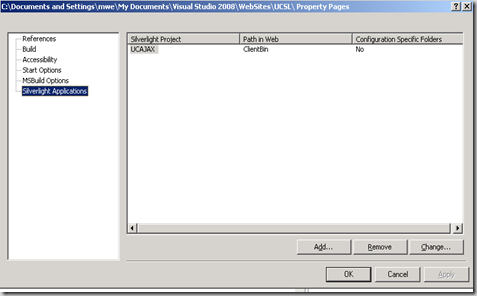
No problems till I first started to run the project. Got the statement that I had to Uninstall the beta 2 and reinstall the beta. This was an easy problem to solve. When you upgrade from silverlight 2 beta 1 to the beta 2 the silverlight project is upgraded. But what wasn't upgraded was the web page that is hosting your silverlight app. This is easy to fix . In your web application properties remove and add your silverlight application.
image

Now you can start your silverlight application.

Invalid cross-thread access

It looked as if everything was working, until I logged in. Then I got an Invalid cross-thread access error.

Hmm something really has changed. In de Microsoft® Silverlight™ 2 Software Development Kit Beta 2 Documentation which has to be downloaded separately there is a list breaking changes between Beta 1 and the Beta 2.

In this case the changes on the HttpWebRequest caused the error. All delegates on the HttpWebRequest are changed to return on a background thread. If you try to update your UI from a background threat you get this error.

The solution

It's quite easy to handle this problem. On all Silverlight Controlls there is a Dispatcher property. Use this property to update your UI

this.Dispatcher.BeginInvoke(delegate()
{
//DO your UI update


});


That were the only things that I had to do upgrading from the beta 1 to the beta 2.


What's coming up next on silverlight beta 2 and CWA. The Beta 2 has a new tabbed control. I had created one my self and I will have a look how easy it is to use this new control.


For more information sip:Marc.Wetters@e-office.com


Friday, June 6, 2008

CWA Client with Silverlight 2 beta 2

I have been able to download Microsoft® Silverlight™ 2 Software Development Kit Beta 2 Documentation. And took a look at something what was really important for me in building a communicator web access with Silverlight 2.

The first thing I looked at was the support for Headers in the HttpWebResponse Class. And too bad it still isn't in there :-(.

For everybody asking why this is such a big deal. This would have made it possible to use silverlight HttpWebRequest/ HttpWebResponse and no need any more for the browsers / ActiveX XMLHttpRequest. So hosting Silverlight controls who access our CWA server still have to run on our CWA server :-( and we still have to develop our silverlight CWA client on a CWA server directly.

What is good is that Silverlight 2 beta 2 now has a tabbed control.

See also: Creating a CWA client with Silverlight 2 beta1 (part 1).

Please contact Marc Wetters @
Sip:Marc.Wetters@e-office.com or send me an email on Marc.Wetters@e-office.com . Enjoy and please feel free to give me your feedback.

Wednesday, June 4, 2008

CWA Client with Silverlight 2 beta 1 Update

Silverlight 2 Beta 2 is nearly here (out at the end of this week).

As soon as I get my hands on the Silverlight 2 Beta 2. I will try and update my application. And will post my findings to see if things have changed for the better.

Main things that should have been changed is the improved cross-domain access and the tabbed control will be introduced.

See also:Envision: Silverlight 2 Beta 2 and the competition

For more information sip:Marc.Wetters@e-office.com

Subscriptions using UCMA part 5: Enhanced Presence

This one is the real interesting one, how can you subscribe to enhanced presence. See also Subscriptions in UCMA part 3: Presence

The sample code here shows how to subscribe to one user. Actually this is a batch subscribe and is easy extensible for multiple users.

This one is much more complex then subscribing to presence using PIDF. The real thing here is enhanced presence. You can subscribe to multiple categories.

First let's create ISipSubscriptionProcessor again. We have to send a message and we have to set our signaling headers correct. This sample doesn't show how to handle the notification message.

public class PresenceSubscriptionEnhanced : ISipSubscriptionProcessor
{
private string _uri = "";
#region ISipSubscriptionProcessor Members

void ISipSubscriptionProcessor.GetExtensionHeaders(SipSubscription.RequestType requestType, out IEnumerable<SignalingHeader> extensionHeaders)
{

List<SignalingHeader> list = new List<SignalingHeader>();
list.Add(new SignalingHeader("Accept", "application/msrtc-event-categories+xml"));
list.Add(new SignalingHeader("Accept", "application/rlmi+xml"));
list.Add(new SignalingHeader("Accept", "multipart/related"));
list.Add(new SignalingHeader("Content-Type", "application/msrtc-adrl-categorylist+xml"));
list.Add(new SignalingHeader("supported", "eventlist"));
list.Add(new SignalingHeader("supported", "ms-piggyback-first-notify"));
list.Add(new SignalingHeader("Require", "adhoclist"));
list.Add(new SignalingHeader("Require", "categoryList"));
extensionHeaders = list;

}

void ISipSubscriptionProcessor.GetMessageBody(SipSubscription.RequestType requestType, out ContentType contentType, out byte[] messageBody)
{
contentType = new ContentType("application/msrtc-adrl-categorylist+xml");
string message = "<batchSub xmlns=\"http://schemas.microsoft.com/2006/01/sip/batch-subscribe\" uri=\"sip:Marc.Wetters@e-office.com\" name=\"\"> <action name=\"subscribe\" id=\"63792024\"> <adhocList> <resource uri=\""+_uri+"\"/> </adhocList> <categoryList xmlns=\"http://schemas.microsoft.com/2006/09/sip/categorylist\"> <category name=\"calendarData\"/> <category name=\"contactCard\"/> <category name=\"note\"/> <category name=\"services\"/> <category name=\"state\"/> </categoryList> </action> </batchSub>";
messageBody = System.Text.Encoding.UTF8.GetBytes(message);

}

void ISipSubscriptionProcessor.ProcessErrorResponse(SipResponseData message)
{
//TODO;
}

public void ProcessNotification(SipMessageData message)
{
string s = message.GetMessageBodyString();
//TODO

}

void ISipSubscriptionProcessor.SubscriptionStateChanged(SubscriptionStateChangedEventArgs eventArg)
{
//TODO
}
#endregion
public string Uri
{
get { return _uri;}
set { _uri = value; }

}
}


Let's subscribe.


public void SubscribePresence(string sip)
{
PresenceSubscriptionPIDF presenceSubscription = new PresenceSubscriptionPIDF();
presenceSubscription.Uri = sip;
SipEndpoint myEndpoint = _endPoint;
RealTimeAddress cgAddress = new RealTimeAddress(sip);
SipSubscription mySubScription = new SipSubscription(myEndpoint, cgAddress, "presence", presenceSubscription);
mySubScription.BeginSubscribe(BeginSubscribeCallback, mySubScription);
}
public void BeginSubscribeCallback(IAsyncResult asyncResult)
{

SipSubscription mySubscription = asyncResult.AsyncState as SipSubscription;
try
{
mySubscription.EndSubscribe(asyncResult);
}
catch (PublishSubscribeException)
{
//Error("An exception occurred when unregistering the session.\n{0}", endpoint.ToString());
}

catch (RealTimeException)
{
//Error("An exception occurred when unregistering the session.\n{0}", endpoint.ToString());
}
}


For more information/questions/remarks please contact me sip:marc.wetters@e-office.com


working at e-office